Party Bunting Sublimation Clipart: Your Design Toolkit
Imagine this: you've just finalized the menu for a client's summer soiree, or perhaps you are designing a new line of reusable party cups for your Etsy shop. You need that festive, fluttering banner look—the kind that instantly screams "celebration"—but you don't have the time or budget to stage a photoshoot. This is exactly where high-quality digital assets bridge the gap between a good idea and a finished product. We aren't just talking about generic stock images here; we are talking about precision tools designed to live on physical objects, specifically the Party Bunting Sublimation Clipart collection.
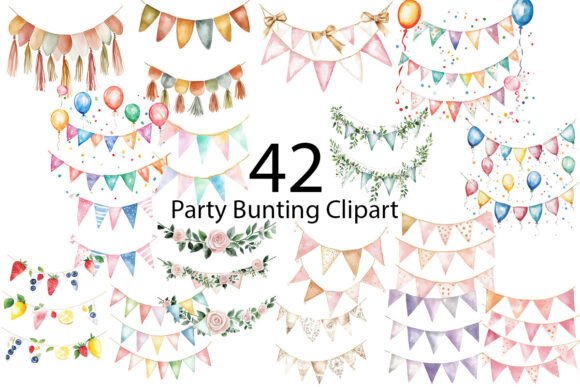
For the uninitiated, the term "sublimation" might sound technical, but for designers and entrepreneurs, it represents a massive shift in how we create merchandise. Sublimation printing allows for vibrant, permanent designs that don't peel or crack because the ink becomes part of the fabric or coating. To make this work, however, you need source files that are exceptionally clean. The collection we are looking at today offers exactly that: 42 PNG files, optimized at 300 dpi with a Transparent Background. This combination is the "gold standard" for anyone serious about print-on-demand or custom stationery.
The Anatomy of a Versatile Design Asset
Let’s break down why these specific technical specs matter for your workflow. The Transparent Background is the most critical feature for creative flexibility. It means you aren't stuck with a white box around your bunting. You can layer these banners over dark textures, vibrant gradients, or busy patterns without needing to mess around with masking tools in Photoshop. Whether you are placing a banner across a vintage photo or a modern, minimalist background, the clipart integrates seamlessly.
Furthermore, the resolution is key. At 300 dpi, these images are print-ready. If you are designing for digital screens only, 72 dpi might suffice, but the moment you move to physical products, high resolution is non-negotiable. If you are creating posters, birthday cards, or wedding invitations, pixelation is the enemy of professionalism. This set ensures that whether you scale the bunting up for a backdrop or down for a sticker, the lines remain crisp and the colors stay saturated.
With 42 distinct variations, you aren't just getting one static image; you are getting a toolkit. Bunting comes in many shapes—pennants, scallops, triangles, and rectangles. Having a variety allows you to maintain a cohesive theme while introducing visual variety. You can use triangular flags for a child's birthday party and scalloped bunting for a sophisticated bridal shower, all from the same asset pack.
From Digital File to Physical Product
The true magic of this Party Bunting Sublimation Clipart lies in its versatility across the marketplace. If you are a small business owner running a print-on-demand store, these files are your bread and butter. Consider the applications:
- Apparel and Accessories: T-shirts are the obvious choice, but think bigger. Tote bags, pillowcases, and even socks can feature these festive motifs. Sublimation works beautifully on polyester fabrics, allowing for all-over prints that look high-end.
- Drinkware: Mugs and tumblers are perennial best-sellers. A wrap-around design featuring fluttering bunting can turn a simple coffee cup into a perfect gift for a teacher, a party host, or a new homeowner.
- Stationery and Paper Goods: This is where the clipart shines for wedding planners and stationers. Use the graphics to embellish wedding cards, greeting cards, and scrapbooking layouts. The transparent PNGs make it easy to create a border or a header design without complex editing.
- Printable Decorations: Digital downloads are a massive market. You can create and sell printable party kits that include banners, cupcake toppers, and invitation templates, all utilizing these clipart elements.
For content creators and bloggers, these assets are invaluable for social media graphics. A quick announcement on Instagram or a "Happy Friday" post on Facebook gains immediate engagement when paired with festive, high-quality visuals. Instead of using the same generic stickers everyone else uses, you can create custom headers for your blog posts or YouTube thumbnails that maintain your brand's unique aesthetic.
Integrating Festive Elements into Brand Identity
There is a misconception that "party" graphics are only for party planners. In reality, elements of celebration are essential in branding and marketing. If you run a bakery, a lifestyle blog, or a family-oriented business, incorporating bunting into your visual language communicates joy, community, and celebration.
However, the key to using clipart effectively is subtlety and consistency. You don't want your brand to look chaotic. Here is how to ensure these assets elevate your visual consistency:
First, consider color matching. If the bunting colors in the clipart pack don't exactly match your brand's hex codes, use the "Hue/Saturation" adjustment layer in your editing software to shift the colors. This ensures the Party Bunting Sublimation Clipart feels native to your brand identity rather than an afterthought.
Second, use the clipart to frame your content. Instead of plastering bunting everywhere, use it to underline headlines or circle key call-to-action buttons. This guides the viewer's eye and improves readability by creating a visual hierarchy. It turns a standard social media post into a cohesive piece of editorial design.
Third, think about packaging design. If you sell physical goods, wrapping paper, tissue paper, or box liners can feature repeating patterns of these flags. It creates an "unboxing experience" that feels premium and thoughtful, increasing the likelihood of repeat customers.
Practical Advice for Execution and Pairing
When working with graphical elements like bunting, the typography you pair them with is just as important as the image itself. Since bunting is decorative and playful, you generally want to avoid overly ornate script fonts or complex display fonts for your main body text. The visual noise can become overwhelming.
Instead, opt for a clean sans serif font for your details (like date, time, and location) to ensure maximum readability. You can use a bold, rounded serif font or a playful handwritten font for the main headline to match the energy of the bunting, but keep the supporting text simple. This contrast creates a balanced composition that looks professional rather than cluttered.
Before you send anything to print—whether it's a poster or a mug—always test your file. Place your design on a mockup template. Does the bunting compete with your logo? Is the resolution holding up at the size you intend to print? Because these files are provided at 300 dpi, you have some room to scale, but always check the edges for sharpness.
Finally, always double-check the licensing. For commercial use, you need to ensure the asset allows for the creation of end products for sale. Most premium clipart packs, including sets like this, are designed with the entrepreneur in mind, allowing you to sell the physical items you create. However, you cannot resell the digital PNG files themselves as standalone assets.
Ultimately, having a library of high-quality design assets is what separates the hobbyist from the professional. Whether you are designing a one-off invitation for a friend or building a product line for a major holiday season, the Party Bunting Sublimation Clipart provides the flexibility, quality, and festive flair needed to get the job done right.